
Ubuntu 22.04

My mid-2010 iMac is supported by Apple up to MacOS 10.13 (High Sierra). As the iMac is in fine condition still, I moved to Ubuntu 22.04. Which I already have on a 2008 (!) Macbook Pro, and an Acer Timeline laptop.

Long story short
Copied the full contents of the (MacOS) home directory to the fresh installed Ubuntu home.
A custom script for opening the MacOS (.webloc) web-links in Ubuntu by just double-clicking.
The MacOS alias could not be that easily used. Replaced those by symlinks, thus losing the refined functionality (of the alias), with a Python-script and, for batch-processing, this shell-script.

MacOS alias to symlink (Python) script: alias2symlink.py
Find MacOS alias files shell script: find_bookmarks.sh
Open MacOS web-links (.webloc) in Ubuntu: open_webloc.sh
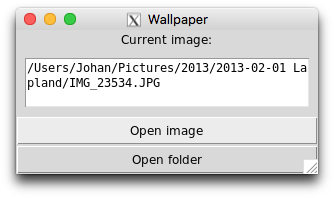
Random wallpaper from pictures and subfolders

The OS X desktop changer does not follow subfolders in the image source folder. Since SnowLeopard the Screensaver will use the images in subfolders but the Desktop changer will not. As a workaround you can create a folder with links to all images, including images in subfolders (recursively).
In System preferences set the Desktop changer to point to the folder with the links as image source.

Here is a shell script that will create symbolic links (in ~/Desktop/Wallpapers) to all pictures (in ~/Pictures) recursively: wallpaper_links.command

This Python script will show the path to the current image: tkWallpaperCurrent.py

tkWallpaperCurrent.py

OS X Toetscombinaties

OSXTC1.jpgOSXTC2.jpg

Een beknopt kaartje met handige toetscombinaties voor de enthousiaste Mac gebruiker.

Download het PDF document OS X Toetscombinaties (PDF 690kB) Bij voorkeur afdrukken op stevig licht gekleurd papier, bijvoorbeeld Store papier Promail color A4 120g/m² zachtgeel bestelnr. PROC794.

osxtc_vouwen.jpg

Snij twee centimeter af van de bovenkant van het gevouwen kaartje.